
View From Face
Configure default section depths for the 2D View From Face tool.
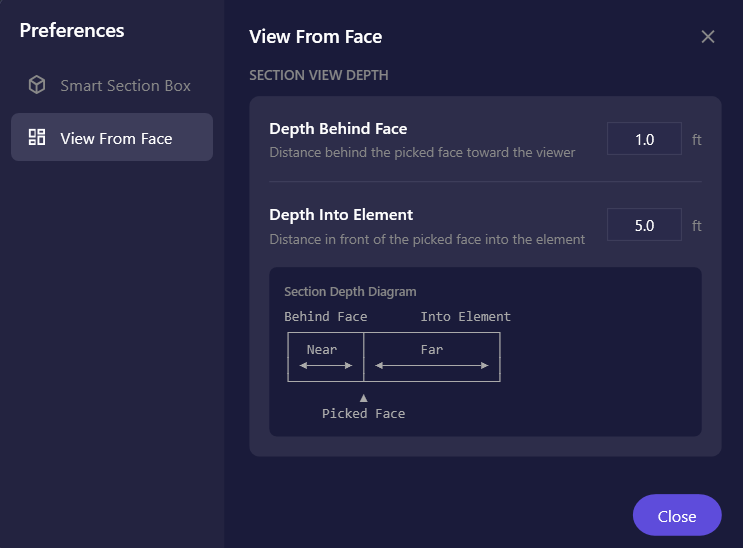
Settings
Section titled “Settings”| Setting | Description | Default |
|---|---|---|
| Depth Behind Face | Distance behind the picked face toward the viewer. Controls how much of the space in front of the element is visible. | 1.0 ft |
| Depth Into Element | Distance in front of the picked face into the element. Controls how deep into the element the section cuts. | 5.0 ft |
Understanding Section Depth
Section titled “Understanding Section Depth”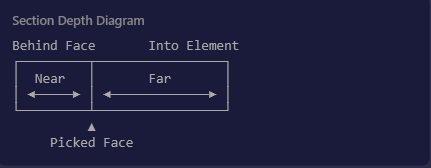
When you pick a face on an element:
- Behind Face (Near): Extends the section view behind the picked surface. Set to 0 to start exactly at the face.
- Into Element (Far): Controls how deep the section cuts into the element. Larger values show more of the element’s depth.
Depth Tips
Section titled “Depth Tips”- Wall sections: Use 1 ft behind, 3-5 ft into for typical wall construction
- Curtain walls: Use 2-3 ft behind to capture framing, 1-2 ft into for glass details
- Equipment: Use minimal behind (0.5 ft), larger into (10+ ft) for internal components
- Floors/Ceilings: Use 1 ft behind, 2-3 ft into for typical assemblies
Values are clamped:
- Behind Face: 0 to 50 feet
- Into Element: 0.1 to 100 feet (minimum 0.1 to ensure visibility)
Related Pages
Section titled “Related Pages”- View From Face - Full tool documentation
- Preferences - Main preferences overview